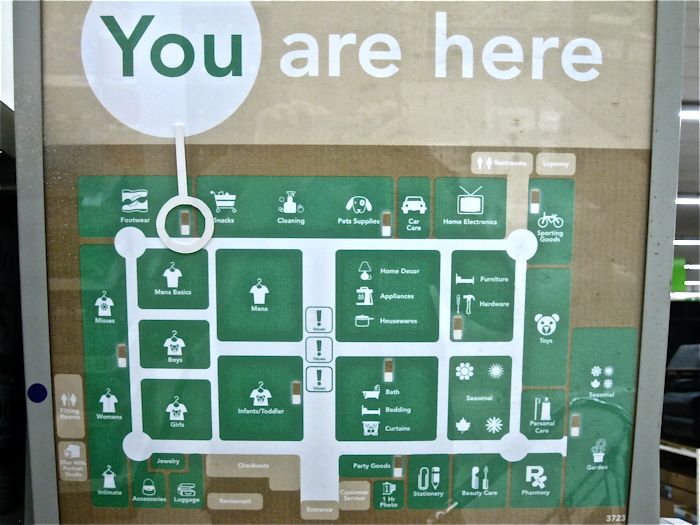
Imagine a visitor walking into a busy hospital, a shopping centre, or an office tower for the first time. They have an important meeting or appointment, but they have no idea where to go. They look around for a sign.
If they can’t find one, or if the sign is confusing, you have a problem.
The best wayfinding system doesn’t need to be fancy. It doesn’t have to be complex. It just has to be functional. If you operate a building, the objective should be straightforward. Guide the visitors so that they won’t have to seek guidance. Otherwise, your employees will keep repeating themselves throughout the day, and that is a sheer waste of their time.
Table of Contents
ToggleKey Points
- The most effective wayfinding systems include maps that provide the quickest route for visitors.
- Your digital wayfinding system in Melbourne should be updated by you via the computer.
- Your display units should be user-friendly, regardless of age or physical limitations.
- Top-notch systems display live data such as room availability to make movement easier.
Why Interactive Wayfinding Is Important
Many businesses make mistakes. They buy expensive, flashy screens and think they are done. But a screen is only useful if it actually helps someone.
Interactive wayfinding is better than a printed poster. A poster never changes. If a room number changes or a hallway closes, that poster is wrong. An interactive screen can change in seconds.
For places like shopping centres, airports, or large offices, this is a big deal. It turns a confused person into someone who knows exactly where to go. It reduces stress and makes your building feel modern.
The Value of Digital Wayfinding in Melbourne
Whether you run an office in the Melbourne CBD or a medical clinic, your digital wayfinding in Melbourne needs to be reliable. Here is why businesses are upgrading:
- You save your staff time: When visitors can find the elevator or the cafe on their own, your team can focus on their actual work.
- You update info instantly: If you change a room name or have an event, you can update every screen in the building in seconds.
- You increase safety: In an emergency, your digital signs can instantly show the best exit routes.
What Features Should You Look For?
If you are looking at wayfinding displays in Melbourne, don’t focus on the fancy tech specs. Focus on these four simple things. If a system doesn’t have these, skip it.
1. Easy Remote Updates (The CMS)
You should never have to use a USB stick to update a sign. You need a system that works over the cloud. This means you can log in to a website from your desk and update your maps or messages. If it isn’t easy to update, you won’t do it and your signs will become outdated.
2. Built-in Accessibility
Your wayfinding signage in Melbourne must work for everyone. This means:
- High Contrast: Use colours that are easy to see for people with poor vision.
- Simple Buttons: Keep touch buttons low enough so someone in a wheelchair can reach them.
- Clear Language: Use simple words and icons that anyone can understand without explanation.
3. Real-Time Data
This is a huge benefit. If your building uses booking software for meeting rooms, your signage should connect to it. If a room is taken, the sign should say “In Use.” If it’s free, it says “Available.” This stops people from walking into meetings that are already happening.
4. “You Are Here” Logic
Never make a visitor guess where they are. When they use your screen, it must show a clear “You Are Here” dot. When they search for a room, the screen should draw a clear line from that dot to the destination.
Comparison: Traditional Signs vs. Digital Systems
| Feature | Printed/Static Signs | Digital Wayfinding Systems |
| Updating Info | Slow (needs new printing) | Instant (do it from your desk) |
| User Experience | Easy to ignore | Interactive and helpful |
| Maintenance | Low upfront, high later | Higher upfront, lower later |
| Flexibility | None | High (change content anytime) |
| Data/Analytics | None | See what people search for |
The “Less is More” Rule
Some designs try to put everything on one screen, like ads, weather, news, and maps. Don’t do this.
In the many years I’ve been installing wayfinding signs in Melbourne, I’ve learned that “less is more.” Most of your visitors only need to find four things: the toilets, the elevators, the reception desk, or a specific exit.
Keep your most important destinations front and centre. If a visitor has to tap the screen three or four times to find the exit, your design is too complicated. Keep it clean and direct.
Is It Really Worth the Investment?
You might wonder if these systems are worth the money.
Think about the cost of someone being lost. In a hospital, it leads to stress and missed appointments. In an office, it leads to late meetings. Research shows that clear navigation helps people feel more in control. It reduces the stress of not knowing where to go.
How to Choose the Right System
Every building is different. Here is how I advise clients to choose:
- For Hospitals: Focus on “easy to follow.” The text should be big and the maps very simple. People in hospitals are often worried; they need the simplest path possible.
- For Airports and Shopping Centres: Focus on speed. Use live data to show what is open and what is closed.
- For Corporate Offices: Focus on style. It should look modern and connect to your meeting room calendars so visitors know exactly where their meeting is.
Frequently Asked Questions
1. What is the cost of installing a wayfinding display system?
It depends on how many screens you need and the software you choose. You pay for the hardware and a small monthly fee for the software. Think of it as an investment in your building’s efficiency.
2. How do digital wayfinding systems help in shopping centres?
They show live routes. If a store is closed or there is construction in a hallway, the map updates automatically to send shoppers a different way.
3. What are the key benefits of digital wayfinding systems?
You save time, your staff gets fewer questions, and your building looks professional and modern.
4. Why is interactive wayfinding better than static signs?
It provides personal directions. A static sign can’t adjust to a visitor’s needs, but an interactive screen can show them the exact path from where they are standing.
5. How can wayfinding systems be customised for different places?
Customisation is handled by the software. We can connect your signs to your existing lists, like room bookings or store directories, so the info is always correct.
Conclusion
Installing wayfinding signs in Melbourne is a wise decision, provided that you make sure it’s kept simple. Visitors only wish to reach their destination effortlessly.
If you concentrate on delivering concise information through user-friendly screens, you’ll always be the winner. Don’t overdo it. An informative and simplistic sign will do you a lot better than an elaborate screen that people won’t comprehend.
Ready to stop visitors from getting lost? Reach out to us today for a quick site audit. We can help you design a digital wayfinding in Melbourne solution that actually works for your specific space.